

Quick reply
Mount your platform as a network drive and reach the whole file tree without using disk space: setup, use cases and requirements.


How does NetExplorer Drive work?
NetExplorer, the French file storage and sharing solution, includes a range of applications across all its plans to suit different needs. Here is a reminder of how NetExplorer Drive works: the connection assistant for the WebDAV network drive.
Downloading NetExplorer Drive
NetExplorer Drive is an application compatible with Windows Vista, 7 and later. To install it on your machine, visit our website. You can then download the tool and enter your sign-in details.
On a Mac you do not need NetExplorer Drive: simply open Finder and connect your platform as a network drive.
A reminder: to use your network drive, enter the address, username and password of your NetExplorer platform, whether you are on Windows or on Mac.
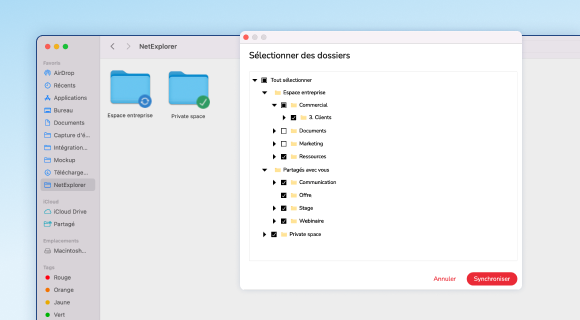
What NetExplorer Drive can do
NetExplorer Drive gives you quick access from your own machine to every file stored on your platform, much as you would use a hard drive or a USB stick. Navigation feels just as natural as it does in Windows, and finding your way around your files is easier.
- Find your work or personal documents quickly and open them without fuss.
- Create new folders and add all sorts of files to them (Office documents, PDFs, images and videos in particular).
- Edit a document straight from NetExplorer Drive. It is then updated automatically on your web platform.
- Avoid duplicates thanks to automatic file locking as soon as editing starts.
When should you use it?
We recommend this tool if you have a good internet connection (SDSL or fibre).
Choosing NetExplorer Drive also means reaching your whole tree of folders and subfolders without taking up space on your computer.
For more information about NetExplorer Drive, call us on +33 5 61 61 20 10 or visit our website.
Other articles you might like
French sovereign cloud: secure hosting and storage in France
What sets a sovereign cloud apart from AWS or Azure, why the Cloud Act changes the picture and how to start migrating your IT.




But let's be honest, our cloud-based file storage and sharing solution is much easier.